
SiteGround: The Managed Google Cloud Engine for High-Trust WooCommerce

How to achieve sub-second dynamic e-commerce speeds on premium cloud infrastructure without managing a single server
There is a painful rite of passage that almost every serious e-commerce founder experiences. We call it the Cheap Hosting Hangover. You started your business with high hopes and a shoestring budget. You signed up for a bargain basement web host that cost two dollars a month. In the beginning, when you only had three visitors a week, everything seemed fine. But then your hard work started to pay off.
You launched a marketing campaign, an influential creator mentioned your product, or your organic search articles began ranking on page one. Dozens of eager customers flooded your storefront at the exact same moment. They clicked Add to Cart, navigated to the checkout counter, and then the nightmare began. The server stalled. The spinning loading icon rotated endlessly. The checkout took eight agonizing seconds to process tax calculations. Half of your buyers abandoned their orders in frustration, assuming your store was broken or insecure. When you frantically contacted customer support, an unhelpful agent told you that your website had exceeded its computer processing limits and suggested you upgrade to a three-hundred-dollar dedicated enterprise plan.
This is the moment of reckoning for an e-commerce brand. A slow, unstable server is an active leak in your financial bucket. You cannot build a multi-million-dollar sovereign brand on fragile, bargain-tier hardware. But you also do not have sixty thousand dollars a year to hire a full-time server engineer to manage private cloud clusters. SiteGround exists to occupy that exact high-performance middle ground. This investigation audits how SiteGround leveraged Google Cloud Platform infrastructure and custom software engineering to create a managed hosting sanctuary for merchants who refuse to compromise on speed, stability, or customer trust.
The Lab Glossary: Core Server Mechanics and Acronyms
Managed Hosting: A premium service where the hosting provider actively handles technical administration, security hardening, automated backups, and server speed tuning for you.
Google Cloud Platform (GCP): Google's enterprise global cloud network. It gives your store the exact same lightning-fast network cables and state-of-the-art data centers that power Google itself.
Site Tools: SiteGround's custom-built, modern administrative portal that completely replaced legacy cPanel with clean, one-click visual controls.
CPU (Central Processing Unit): The central electronic brain of a computer server that calculates numbers and executes code.
CPU Resource Limits: The strict boundary on how much brainpower your website is allowed to consume before an overloaded host temporarily pauses your store.
01. Identity & Origin: The Engineering Obsession
SiteGround was founded in 2004 by a group of university friends in Sofia, Bulgaria. From their earliest days, they approached hosting from an engineering perspective rather than a marketing perspective. While competitors grew by acquiring dozens of decaying hosting brands and packing tens of thousands of websites onto aging servers, SiteGround invested heavily into proprietary software development.
In 2020, SiteGround made one of the boldest infrastructure moves in hosting history. They completely migrated their entire global hosting infrastructure onto Google Cloud Platform. Instead of building and maintaining private data center warehouses across the globe, they chose to run their services on Google's enterprise-grade virtual machines, matching one hundred percent of their energy consumption with renewable green energy.
On top of Google's global cloud foundation, SiteGround built their own software layers: a custom Linux container architecture, their proprietary Site Tools control panel, and specialized performance software like SuperCacher and Ultrafast PHP. Today, SiteGround is one of the very few hosting providers officially recommended by the WordPress.org core leadership. They are engineered specifically for the High-Trust Operator: the established brand, the high-traffic publication, and the serious WooCommerce merchant who treats server speed as a direct mathematical driver of profitability.
02. The Command Center Analysis: The Engine Room and The Store Cockpit
Our lead researchers conducted an exhaustive visual audit of SiteGround's dual-interface architecture. Unlike legacy hosts that disconnect your server settings from your daily operations, SiteGround provides two synchronized command centers.
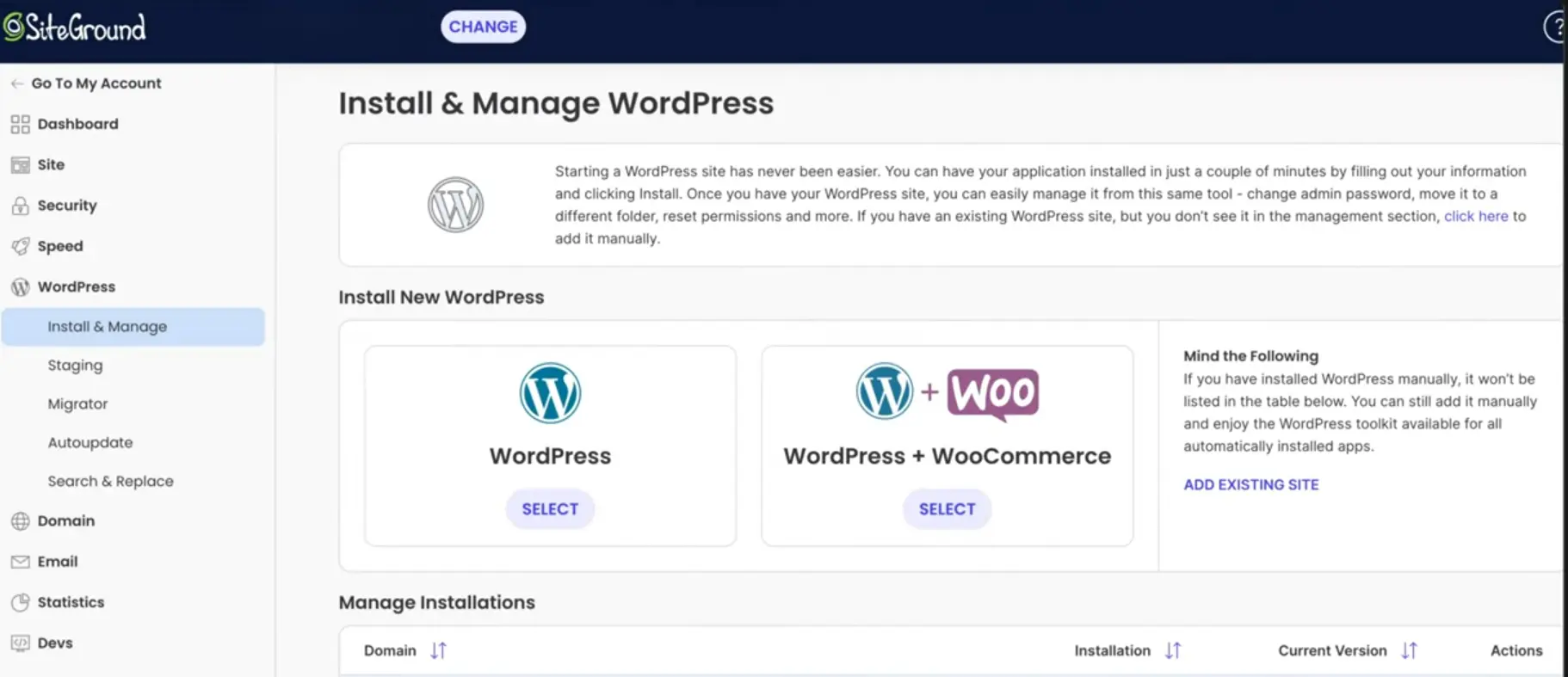
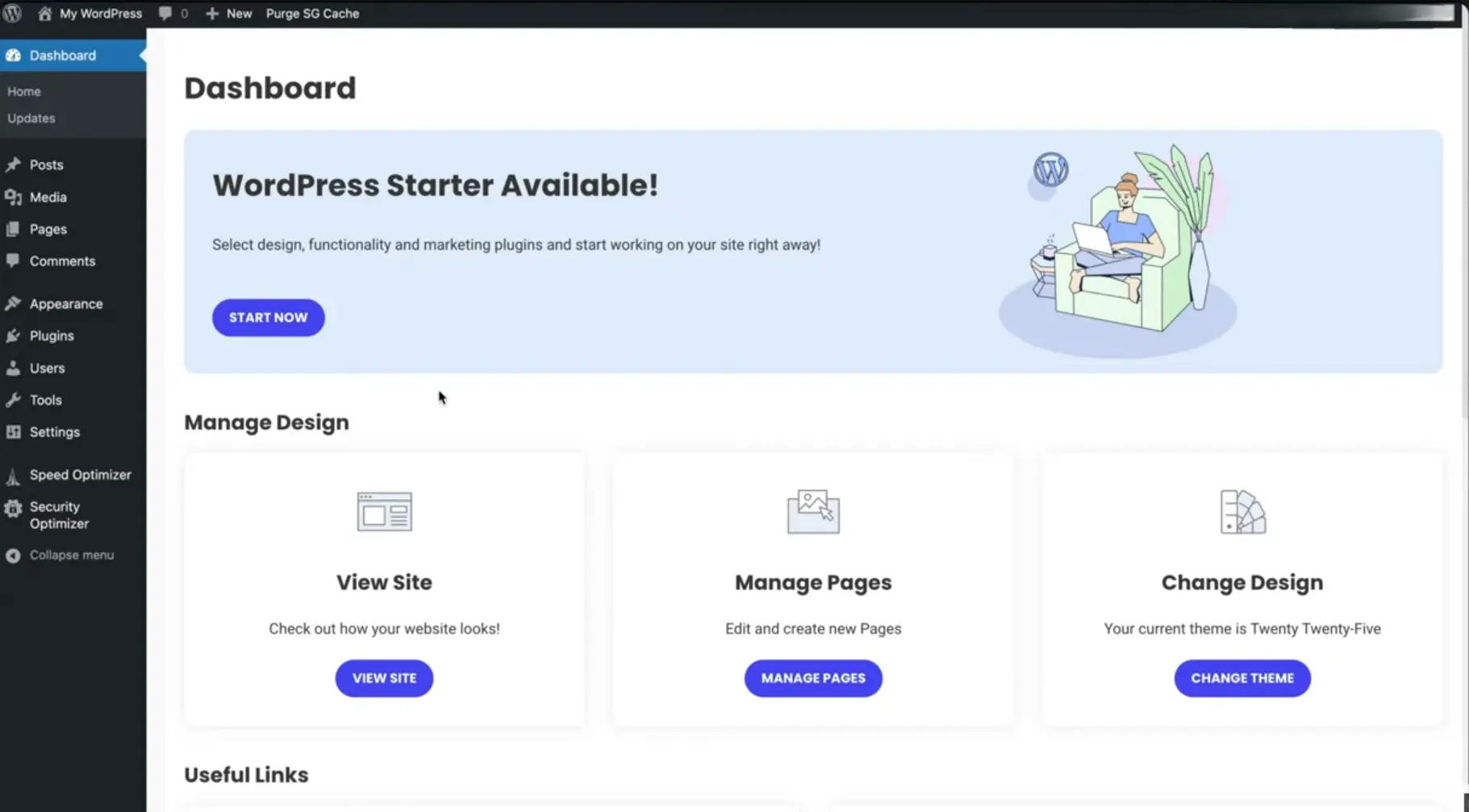
03. The Thermodynamics of Dynamic Checkout: SuperCacher and Ultrafast PHP
We often speak of the thermodynamics of an online store. In science, Thermodynamics is the study of how heat, work, and energy move through a physical system. When applied to computer servers, the concept becomes wonderfully simple.
Every single calculation your server performs requires electrical energy, computer processor time, and memory. If your server is forced to perform heavy labor every time someone clicks a link, the system overheats, calculations back up in line, and your website slows down. The entire goal of server engineering is to minimize this thermodynamic friction, making the computer perform the least amount of heavy physical lifting possible to hand your product page to a customer.
Simple static websites are easy to speed up because every visitor sees the exact same page. But an e-commerce store is an entirely different technological beast. A store is dynamic. Every visitor has a personalized shopping cart, custom geographical tax calculations, live inventory deductions, and private account details.
Standard cheap web hosts crumble under dynamic commerce because their caching tools cannot separate static images from dynamic shopping carts. They either cache the cart by mistake, showing one customer what someone else put in their bag, or they turn off caching entirely, forcing the slow server processor to recalculate the entire website from scratch on every click.
SiteGround engineered a three-tiered technological solution to solve this exact thermodynamic bottleneck:
1. NGINX Direct Delivery: SiteGround servers use high-speed NGINX web servers to deliver static assets like product images, CSS stylesheets, and design fonts directly from the server memory. The main server processor never wastes energy loading these files, cutting load times by up to fifty percent.
2. Dynamic Caching with Automated Smart Invalidation: Built on their custom SuperCacher software, SiteGround automatically creates instant, pre-built memory snapshots of your product pages and blog articles. The moment you update a product price or inventory count, the system automatically flushes and updates only that specific page in memory in real time without human intervention.
3. Custom Ultrafast PHP and Memcached: On higher tiers, SiteGround deploys their custom-compiled Ultrafast PHP architecture. This proprietary code execution pipeline processes dynamic checkout queries up to thirty percent faster than standard PHP setups. Coupled with Memcached, which stores complex database queries in high-speed RAM, your store handles simultaneous checkout rushes without database timeouts.
The Lab Glossary: Decoding the Acronyms and Software Engines
Cache: Originating from the French word cacher, meaning to hide or store safely. Think of it like keeping a prepared cup of coffee in a thermos right on your desk instead of grinding fresh beans and brewing a new pot every single time you want a sip.
PHP (Hypertext Preprocessor): Originally named Personal Home Page tools. It is the core programming language that reads your store data and builds your WordPress pages dynamically before sending them to a customer screen.
NGINX (Engine-X): Pronounced Engine-X. A high-speed web server program designed specifically to solve the famous challenge of handling more than ten thousand visitors at the exact same moment without crashing.
RAM (Random Access Memory): Ultra-fast temporary computer memory. Think of it like the flat surface of your office desk where you keep active papers ready for instant use, compared to walking down to a basement filing cabinet every time you need a document.
Dynamic Content: Web pages that change uniquely for each visitor, such as shopping carts, account profiles, and live inventory levels.
SuperCacher: SiteGround's proprietary multi-layer caching engine engineered specifically for high-speed WordPress and WooCommerce delivery.
Memcached: A specialized speed tool that remembers complex database queries in fast RAM memory so the database does not have to recalculate the exact same question hundreds of times.
Ultrafast PHP: SiteGround's custom-engineered programming execution environment that accelerates dynamic page generation by up to thirty percent.
04. The Founder Journey: How Artisan Moss Scaled Bespoke Botanical Art
To witness how managed infrastructure impacts an authentic brand, look at the journey of Artisan Moss, a handcrafted botanical design studio in California producing bespoke, preserved living plant artwork for luxury residences, commercial hotels, and corporate offices.
Their commercial model is defined by visual beauty and custom design inquiries. Every piece of moss artwork is custom-framed and photographed in ultra-high resolution to display intricate textures and organic greenery. On basic web hosting, their website suffered terribly. Loading high-resolution artwork files slowed page load times to a crawl, while potential interior design clients who wanted to order custom dimensions experienced sluggish form submissions and payment delays.
Closed e-commerce platforms did not fit their brand vision. They needed deep WordPress design freedom to present their artwork like an exclusive museum gallery. The founders moved their digital flagship to SiteGround's managed cloud infrastructure. The impact was immediate. Utilizing Google Cloud servers and automated NGINX image delivery, their heavy gallery pages loaded in sub-second times across the United States. During major seasonal home design features and viral press coverage, their store handled thousands of concurrent high-resolution page visits with zero server hiccups. Today, Artisan Moss operates as an elite national design brand, demonstrating that sovereign WooCommerce running on managed Google Cloud infrastructure delivers luxury speed without agency overhead.
05. The Financial Audit: The Honest 2026 Price Stack
As Lead Researchers, we must speak with complete financial transparency. We do not want you to face unexpected surprises on your billing statements. In the web hosting industry, providers advertise an introductory discount for your initial contract term, after which the service renews at its standard regular rate. Here is the exact breakdown of what you pay on day one and what you pay upon renewal.
The 2026 SiteGround Managed WooCommerce Price Stack
- StartUp Plan (Introductory 12-Month Commitment): You pay roughly $2.99 per month for your first 12-month contract, which is billed as a single upfront payment of approximately $35.88 for your entire first year. When your 12-month promotional period concludes, the plan renews at its standard regular rate of $17.99 per month (billed annually at $215.88 per year). Includes 10 GB of storage, one website, automated daily backups, free SSL certificates, and support for roughly 10,000 monthly visits.
- GrowBig Plan (Introductory 12-Month Commitment): The definitive sweet spot for serious WooCommerce merchants. You pay roughly $4.99 per month for your first 12-month contract, billed as a single upfront payment of approximately $59.88 for your full first year. Upon renewal after 12 months, the plan renews at its standard regular rate of $29.99 per month (billed annually at $359.88 per year). Supports unlimited websites, 20 GB of storage, roughly 100,000 monthly visits, Ultrafast PHP, on-demand manual backup copies before major updates, and the automated one-click WordPress Staging tool.
- GoGeek Plan (Introductory 12-Month Commitment): The enterprise tier for high-volume stores. You pay roughly $7.99 per month for your first 12-month contract, billed as a single upfront payment of approximately $95.88 for your first year. Upon renewal after 12 months, the plan renews at its standard regular rate of $44.99 per month (billed annually at $539.88 per year). Delivers 40 GB of storage, supports roughly 400,000 monthly visits, grants the highest tier of dedicated server memory resources, priority human support routing, and white-label client management tools.
Tycoon Math: Even at its standard full renewal rate of $359.88 per year, the SiteGround GrowBig tier is more cost-effective than Shopify's entry plan ($468 per year) while granting you dedicated Google Cloud infrastructure, unlimited websites, full data sovereignty, and zero extra transaction fees.
06. Hostinger vs SiteGround: The Architectural Verdict
Because Business Lens Lab audits tools through a first-principles lens, founders frequently ask us how to choose between our two top-rated infrastructure providers: Hostinger and SiteGround. The answer depends entirely on your capital strategy and your store maturity.
Choose Hostinger if: You are bootstrapping your business with strict capital limits, testing your first product catalog, and want the absolute lowest cost per month. On their 48-month commitment, plans start at $2.99 to $3.99 per month, and their long-term renewal rates stay exceptionally low. Hostinger's LiteSpeed servers and custom hPanel deliver phenomenal speed that punches far above its price tag for builders on a budget.
Choose SiteGround if: Your business has verified traction, you process hundreds of live orders, and server downtime or dynamic checkout lag would immediately cost you thousands of dollars in lost sales. SiteGround's Google Cloud foundation, Ultrafast PHP execution, one-click staging environments, and rapid human support make it the superior choice for high-trust commercial scaling.
SiteGround has mastered the art of high-trust managed e-commerce. By combining the global hardware strength of Google Cloud Platform with custom software engineering like Ultrafast PHP and in-dashboard caching controls, they eliminate the fear of self-hosted WooCommerce. It is not the cheapest hosting on the market, but it is one of the most reliable investments a growing merchant can make to protect their conversion rates and buy back their peace of mind.
Lab Rating: 9.9/10, The Gold Standard for Managed WooCommerce
Primary Recommendation: Select the GrowBig plan on the 12-month introductory term. The inclusion of on-demand staging environments and custom Ultrafast PHP provides the exact speed and safety net required to run a high-converting, professional e-commerce enterprise without technical anxiety.