
Elementor: The Visual Design Engine for Sovereign WooCommerce

How to break free from rigid WordPress themes and design a bespoke e-commerce store without writing code
There is a devastating moment of disappointment that almost every first-time WordPress merchant goes through. You did everything right. You secured high-performance cloud hosting with Hostinger or SiteGround. You installed WooCommerce. You picked out a clean theme, uploaded your first five products, and previewed your live website. But when the page loaded on your screen, your heart sank.
Your store looked completely generic. The product photo was awkwardly placed in a rigid left column. The title font was small and uninspiring. The Add to Cart button was stuck in a static position that looked like an outdated blog from 2012. You wanted to move your pricing beneath the description, add reassuring customer security badges right beneath the checkout button, create a modern slide-out cart drawer, and design an announcement bar across the top of your shop. But when you opened your theme settings, you hit a concrete wall. The theme options only allowed you to change two colors and pick three fonts. To change anything else, a message informed you that you must write custom CSS programming code or edit complex PHP theme template files.
This is what we call the Template Cage. You chose open-source WooCommerce to own your business and escape platform restrictions, yet you find yourself trapped inside someone else's rigid design template. You are faced with two painful choices: accept an amateur store that fails to build customer trust, or hire a professional web design agency for four thousand dollars to write custom theme code. Elementor was engineered to completely destroy the Template Cage. This investigation audits how Elementor transformed the mechanics of WordPress web design, breaks down the confusing difference between free directory plugins and paid Pro licenses, and proves how a non-technical founder can build an enterprise-tier visual storefront for less than sixty dollars.
The Lab Glossary: Decoding the Coding Acronyms
CSS (Cascading Style Sheets): The visual styling language of the web. If HTML is the physical brick skeleton of a building, CSS is the paint on the walls, the carpet on the floor, and the lighting in the ceiling. It controls colors, fonts, margins, and borders.
PHP (Hypertext Preprocessor): Originally named Personal Home Page tools. It is the behind-the-scenes server programming language that executes the logic of WordPress, fetching your product data and assembling web pages dynamically before sending them to a customer.
HTML (Hypertext Markup Language): The foundational code that places raw text, buttons, and pictures onto a computer screen.
Visual Builder: A modern design interface where you construct web pages by dragging visible boxes, images, and buttons onto a live screen, seeing the exact result instantly without writing code.
Theme Builder: An advanced software tool that lets you design the permanent structural frames of a website, including your top navigation header, footer, single product templates, and product category pages.
Dynamic Tags: A powerful feature that pulls live information directly from your database, automatically inserting the correct product title, price, or inventory count onto the screen.
Breakpoints: The specific screen width settings that allow you to adjust your store design so it looks perfect on desktop monitors, tablets, and smartphones.
Widgets: Pre-built design blocks, such as image carousels, pricing tables, testimonials, or Add to Cart buttons, that you drag onto your page.
01. Identity & Origin: The Visual Rebellion
Elementor was founded in 2016 by two Israeli designers, Yoni Luksenberg and Ariel Klikstein. For years, they ran a professional digital agency building custom WordPress websites for clients. They were deeply frustrated by how slow, fragmented, and painful the WordPress development process had become. Every minor design change required writing custom lines of CSS stylesheet code, refreshing the browser, checking server logs, and writing custom theme template functions.
They realized a fundamental first principle: Designers and entrepreneurs should be able to create live websites visually, in real time, without technical code standing between their creative vision and the final screen.
They built their engine around the concept of WYSIWYG, which stands for What You See Is What You Get, pronounced wizzy-wig. In traditional web development, you write blind lines of code into a text file, save it, and reload the browser hoping it looks right. With WYSIWYG, the editing screen looks identical to the live published store. When you move an Add to Cart button two inches to the left, it moves right before your eyes.
Today, Elementor powers over ten million active websites worldwide, representing nearly ten percent of the top one million sites on the entire internet. It was built for the Self-Reliant Creator: the entrepreneur who demands complete creative control over their digital storefront without paying an agency retainer.
02. The Command Center Analysis: Social Proof and The Pro Bridge
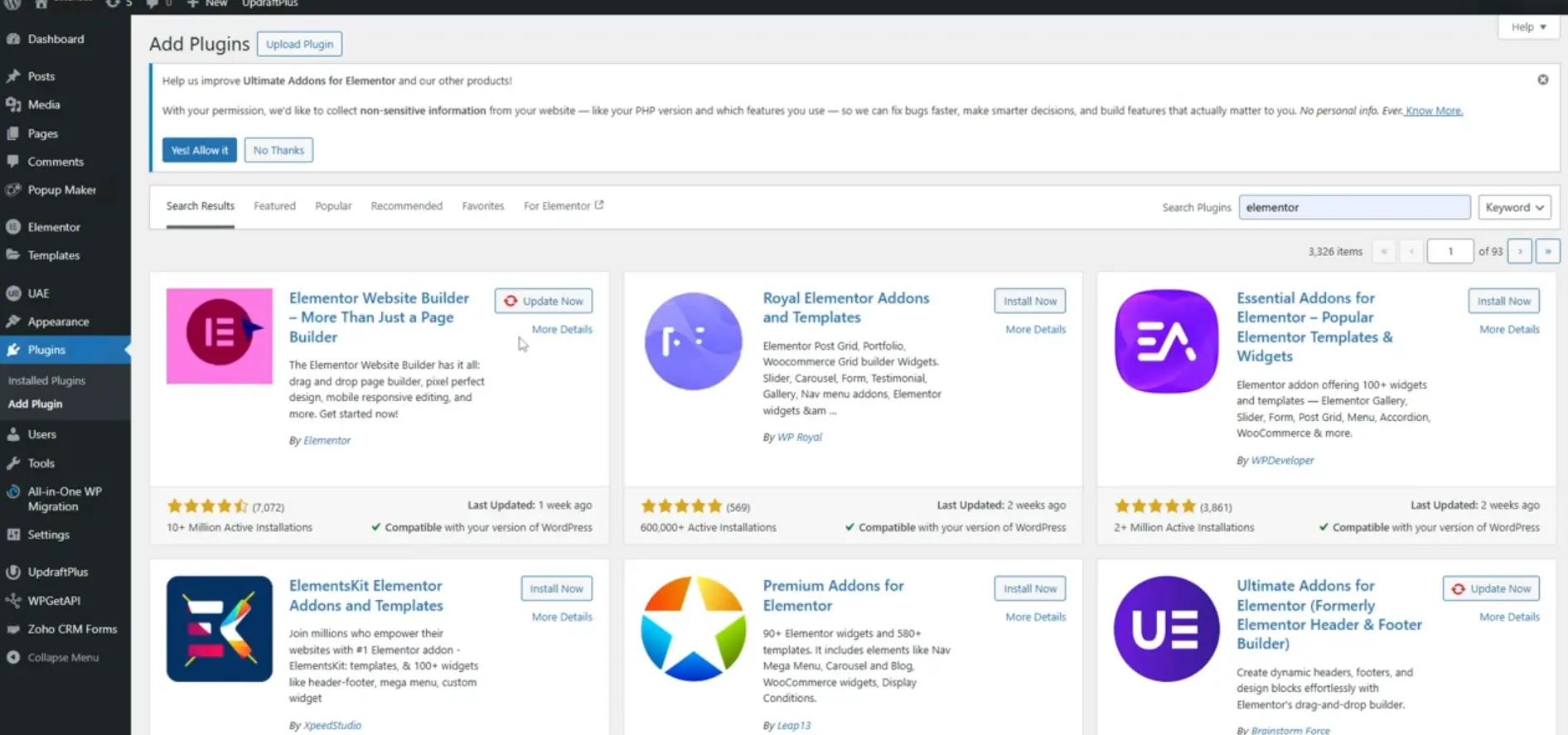
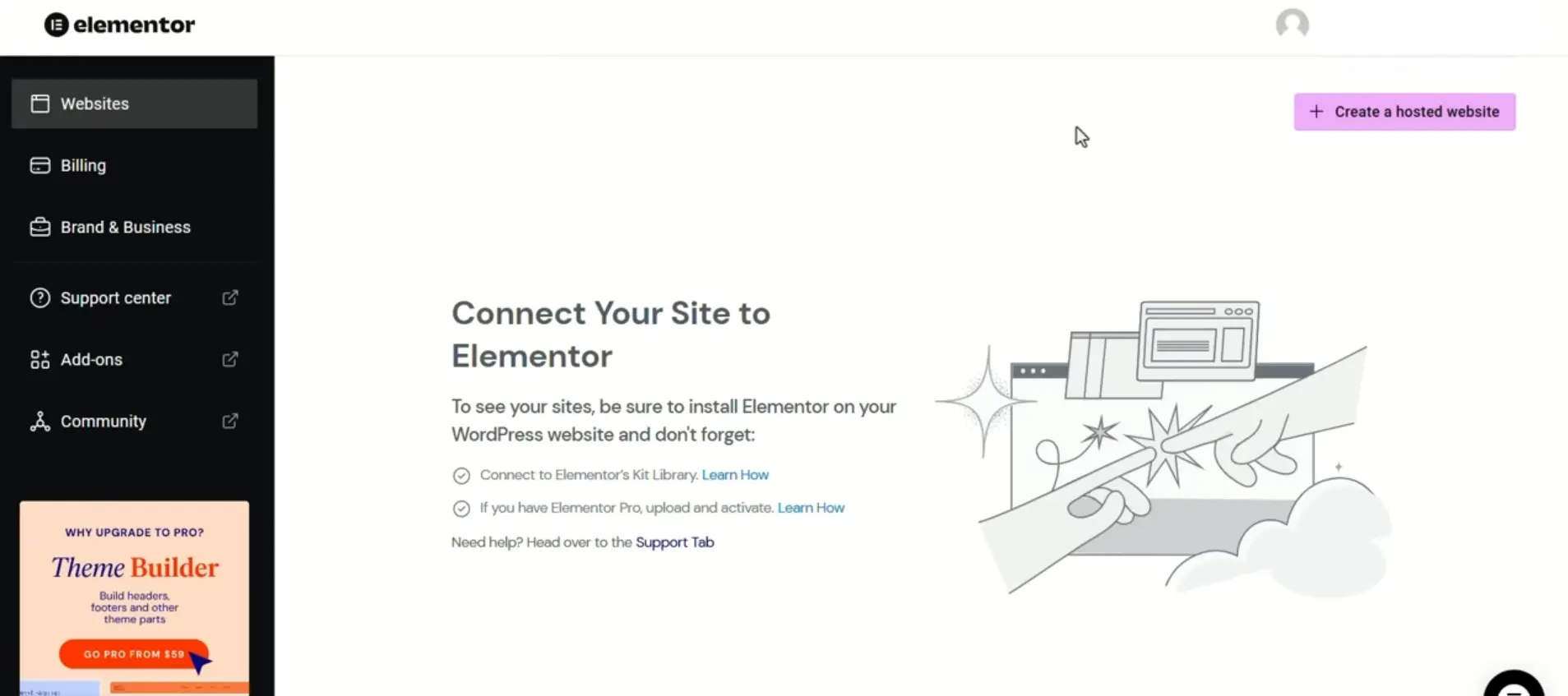
Our lead researchers conducted an exhaustive visual audit of Elementor's position within the WordPress ecosystem. Below is the tangible proof of their market dominance and the exact interface where your store connects to the cloud.
03. Free vs Pro: Unlocking the Confusing WordPress Marketplace
One of the greatest sources of frustration for new entrepreneurs is understanding why a plugin is listed as free in WordPress, yet requires a paid license for serious business. Let us eliminate this confusion forever through a clear first-principles breakdown.
When you install the free version of Elementor through your Hostinger or SiteGround control panel, you receive the visual page editor. You can design individual landing pages, write beautiful blog articles, and arrange photos and text columns. For a simple personal portfolio, the free version is wonderful.
However, e-commerce stores do not operate on static pages. An e-commerce store runs on Dynamic Templates. You do not design five hundred individual pages for five hundred products. You design one single master template, and WooCommerce automatically feeds the correct product title, image gallery, price, and customer reviews into that template based on what the shopper clicked.
The free version of Elementor completely locks you out of these dynamic WooCommerce components. Here is what the free version cannot do, and what Elementor Pro unlocks:
The Operational Division: Free vs Elementor Pro
- Single Product Builder: Free cannot edit product layouts. Pro lets you visually drag the Product Title, Image Gallery, Pricing Table, Variations Dropdown, and Add to Cart button anywhere on the screen.
- Product Archive and Category Builder: Free forces you to use the default theme shop page. Pro lets you design custom product grids, filter sidebars, badge overlays, and sale banners.
- Custom Cart and Checkout Builder: Free leaves you with generic WooCommerce checkout tables. Pro lets you design a high-converting, distraction-free checkout with multi-step forms and custom trust guarantees.
- Interactive Slide-Out Cart: Pro includes a dynamic cart drawer that slides smoothly from the side of the screen when a customer clicks buy, preventing jarring page reloads.
- Popup and Lead Capture Engine: Pro includes an integrated popup builder with behavioral triggers, eliminating the need to pay thirty dollars a month for separate email capture apps.
04. The Business Lens Lab Navigation Compass: How to Activate Pro in 60 Seconds
At Business Lens Lab, our mission is to eliminate the scatter-brained exhaustion of hunting through confusing technical forums. You never have to search blindly across the internet because we curate the verified direct pathways right here in our laboratory.
Here is the streamlined, four-step operational protocol to deploy your custom visual store:
Step 1: Deploy the Free Foundation: Log into your hosting environment (Hostinger or SiteGround) and ensure WordPress and WooCommerce are installed. Go to Plugins, search for Elementor, and activate the free engine.
Step 2: Access Your Pro License via Our Verified Partner Link: Click the official Elementor Pro partner link on this page. This takes you directly to the authentic plan selection portal on elementor.com with zero confusion.
Step 3: Select the Essential Plan ($59 per year): For a single store, you do not need the expensive agency packages. The Essential plan delivers the complete Theme Builder, the full WooCommerce Builder suite, and premium customer care.
Step 4: One-Click Cloud Activation: Once your license is secured, return to your WordPress dashboard. Click the Elementor tab, select License, and click Connect & Activate. Enter your Elementor login details. Your WordPress store links to your license instantly, unlocking all the WooCommerce widgets and templates with zero manual coding.
05. The Founder Journey: How Sneakers ER Built a Custom Footwear Empire
To understand the power of visual design in modern commerce, examine the journey of Sneakers ER, a globally recognized sneaker care, restoration, and premium cleaning brand based in Glasgow, Scotland.
Founded by two lifelong sneaker collectors and restoration specialists, their business model merged professional shoe care products with specialized in-person restoration services. Their product line included proprietary cleaning solutions, premium brushes, customized paint pens, and hydrophobic protection sprays. Selling high-ticket sneaker restoration requires an uncompromising visual aesthetic. Sneakerheads are obsessed with fine visual details, crisp branding, streetwear culture, and industrial design.
On generic e-commerce templates, their store looked flat, clinical, and uninspiring. Traditional themes forced their specialized restoration pens into standard boring boxes that failed to communicate the craftsmanship of the product. The founders did not want to pay an agency five thousand pounds every time they launched a new seasonal product line or needed a custom promotional landing page. They deployed WooCommerce paired with Elementor Pro. The impact on their brand was transformative. Using the Theme Builder, their internal team visually crafted immersive, dark-mode product pages with custom video backgrounds, high-contrast typography, and tailored interactive product bundles. Today, Sneakers ER operates flagship clean-care service stations inside luxury retailers like Selfridges while processing thousands of international product orders through their bespoke, visually striking WooCommerce storefront.
06. The Financial Audit: The Honest 2026 Price Stack
As Lead Researchers, we must evaluate capital expenditure from a strategic founder perspective. Here is the realistic financial reality of deploying Elementor Pro in 2026.
The 2026 Elementor Pro Price Stack
- Essential Plan ($59 per year): Engineered for one website. Delivers the complete Theme Builder, the full WooCommerce Builder, over one hundred premium widgets, and standard technical support. This is the definitive choice for the sovereign solo founder.
- Advanced Plan ($99 per year): Supports up to three websites. Unlocks specialized developer tools and expanded template libraries. Ideal for entrepreneurs running multiple niche product storefronts.
- Expert Plan ($199 per year): Supports up to twenty-five websites. Delivers the complete agency kit with dedicated VIP technical care. Built for growing digital consultants and multi-brand operators.
Strategic Leverage: Paying $59 per year for Elementor Pro breaks down to less than five dollars a month. That five-dollar investment completely eliminates the need to pay an agency thousands of dollars for custom theme development, while giving you the power to update and launch new product pages in minutes.
Elementor Pro is the indispensable visual bridge that makes sovereign WooCommerce accessible to everyday entrepreneurs. It liberates you from the Template Cage, granting you the creative power of a senior front-end web developer through an intuitive visual canvas. For less than five dollars a month, it eliminates thousands of dollars in agency fees and gives your brand the bespoke visual polish required to build deep customer trust. It is a mandatory asset for any merchant serious about sovereign e-commerce.
Lab Rating: 9.8/10, The Essential Visual Engine
Primary Recommendation: Install the free core plugin via your hosting setup assistant, and acquire the Essential Pro license directly through the verified partner link below. Unlock the WooCommerce Theme Builder and build a store that reflects your vision without writing code.