Zapier: The Linear Automation Pioneer
How the world's most extensive software catalog eliminates the communication gap between business applications
In the modern commercial world, every business operates on a mountain of disconnected software. A dental clinic uses an online appointment calendar, an SMS messaging service, and a specialized patient ledger. A real estate agency uses Facebook lead ads, a customer database, and a digital contract signing tool. A local roofing contractor uses an email contact form, an estimating spreadsheet, and an accounting program. Each individual tool performs its designated job with excellence. Yet between these applications lies an agonizing void: the gap of manual human data entry.
When an interested customer submits an inquiry on your website at nine o'clock in the evening, that inquiry does not automatically close itself. A human must see the notification, open the contact database, retype the customer's phone number, compose an introductory email, and set a reminder on a calendar. If that business owner is busy on a construction site, meeting with a client, or resting with their family, that inquiry sits in the dark. Research demonstrates a brutal commercial reality: if an incoming business inquiry is not followed up within five minutes, the probability of closing that deal plummets by nearly four hundred percent. By the time a tired business owner manually processes their inbox the following morning, the prospect has already hired a faster competitor.
For decades, bridging this gap required contracting software engineers to write custom code connectors. Small businesses and service providers were completely shut out from automation because building a custom connection between two software programs cost thousands of dollars. Zapier changed the landscape of the digital economy forever. They introduced a universal standard that allowed non-technical business owners to build instant, automated bridges between applications in less than five minutes. This investigation audits the engineering behind Zapier, demystifies the mechanics of task calculations, and reveals when linear workflows provide the ultimate leverage for growing businesses.
The Lab Glossary: The Core Zapier Vocabulary
Zap: The complete automated workflow connecting your applications. A Zap consists of at least one Trigger and one Action.
Trigger: The specific initial event that kicks off the automated sequence, such as a customer submitting a new lead form.
Action: The specific task that Zapier performs automatically after the Trigger fires, such as sending a text message or creating a spreadsheet row.
Task: A single successful action executed by a Zap. Understanding tasks is critical because Zapier pricing plans are determined by how many tasks your account consumes each month.
Polling: The process where Zapier checks an application at regular intervals (such as every five or fifteen minutes) to see if new data has arrived.
Instant Webhook: A high-speed digital trigger that sends data across the internet the exact millisecond an event occurs without waiting for a polling interval.
01. Identity & Origin: The Startup Weekend Hackathon
The story of Zapier began in Columbia, Missouri, in October 2011. Three friends—Wade Foster, Bryan Helmig, and Mike Knoop—were working in the trenches of web development and freelance client services. Bryan and Mike spent endless hours writing repetitive, custom API programming scripts for small business clients who simply wanted their PayPal transaction records to show up automatically inside their Mailchimp email accounts.
They realized that thousands of small businesses were suffering from the exact same technical bottleneck. During a local fifty-four-hour Startup Weekend hackathon, the trio built the working prototype of Zapier. They established a First Principle of Digital Work: The software a company chooses should never hold their data hostage, and a business owner should never have to hire an engineer just to make two computers share a simple message.
When they submitted their prototype to the prestigious Silicon Valley startup accelerator Y Combinator, critics doubted their business model, claiming that major tech giants would simply build their own internal connections. The founders knew better. Software companies are competitors: Google does not want to spend its engineering resources building custom connectors for Microsoft, and Microsoft does not prioritize seamless data sharing with Apple. Zapier became the neutral, universal Switzerland of the internet. Today, Zapier supports over seven thousand integrated applications, processing billions of automated actions for millions of companies worldwide. It was engineered for the Practical Operator: the business owner who prioritizes immediate reliability and massive software compatibility above all else.
02. The Command Center Analysis: The Linear Assembly Line
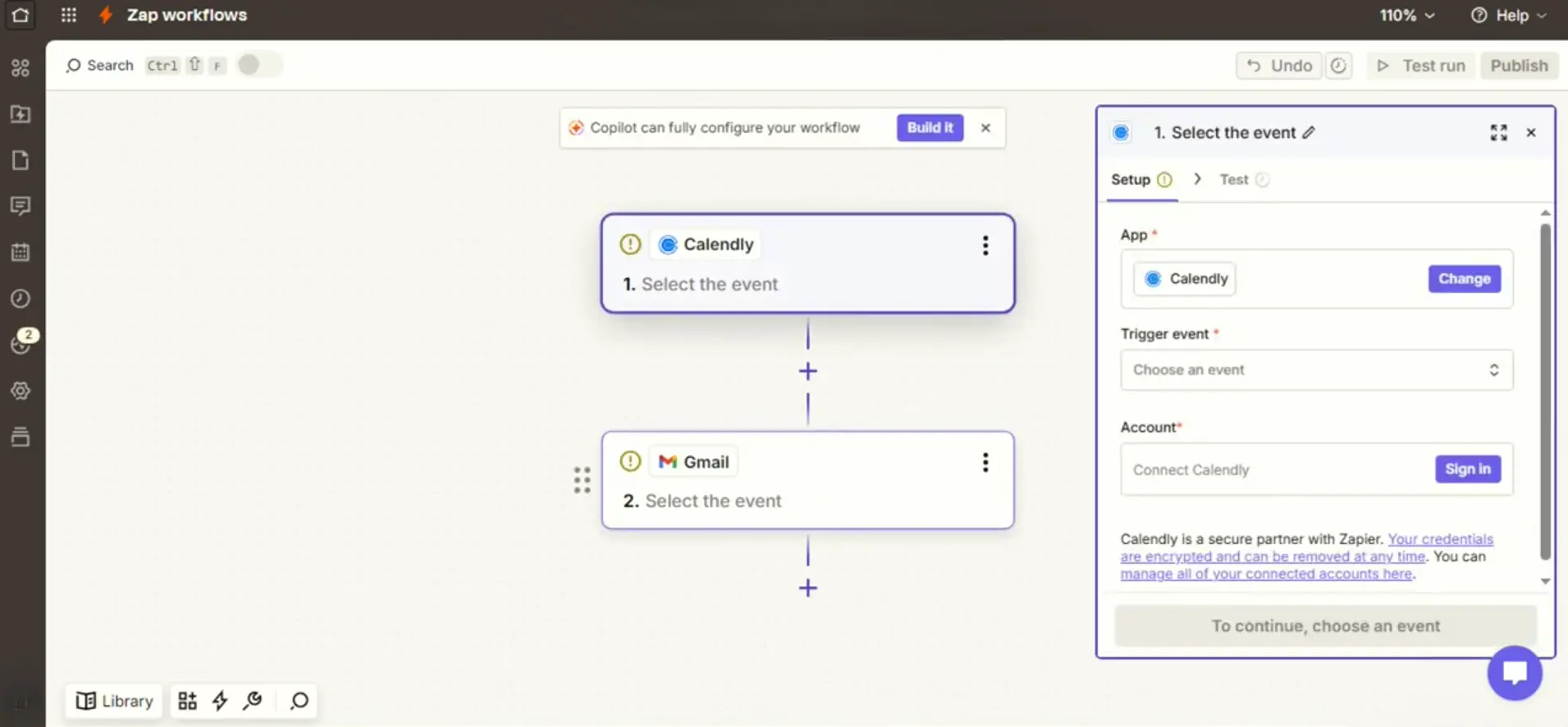
Our lead researchers conducted an exhaustive visual audit of Zapier's live workflow design environment. Look at the structured interface below.
03. The Mechanics: How Triggers and Tasks Function Under the Hood
To operate Zapier with complete confidence, a business owner must understand the mechanical physics of how data moves from an external tool into the Zapier engine. A Zap executes work through three core steps:
1. The Listening Stage (Triggers and Webhooks): How does Zapier know an event happened? It uses two methods. On older applications, Zapier uses Polling, which means the server visits your account every few minutes to ask if new records exist. On modern applications, it uses an Instant Webhook, where the external app actively pushes the data packet into Zapier the microsecond an event finishes.
2. The Transformation Stage (Formatters and Filters): Often, incoming data arrives in the wrong format. A phone number might arrive without an area code, or a customer name might arrive in all capital letters. Zapier includes built-in Formatter tools that clean up text, calculate dates, and standardize numbers before sending them onward, ensuring your records stay pristine.
3. The Execution Stage (The Action and Task Accounting): Once the data is verified, Zapier commands the receiving application to create a record. This is where Task Accounting occurs. Triggers do not consume tasks. If one thousand people view your form, you consume zero tasks. A task is only consumed when Zapier successfully executes an Action step, such as adding a row to a spreadsheet or creating an invoice.
The Lab Glossary: Advanced Workflow Features
Multi-Step Zap: An automated workflow that executes more than one action from a single trigger, such as simultaneously updating a database, sending an SMS, and notifying a team channel.
Paths: Conditional logic gates that allow a single Zap to perform different actions based on if-then rules, such as routing high-budget leads to a senior team member.
Filter: A gatekeeper rule that halts a Zap if incoming data does not match specific criteria, protecting your task budget from unwanted records.
Webhooks by Zapier: A specialized developer tool that allows you to connect custom websites and proprietary software tools that do not yet have an official pre-built app integration.
04. Real-World Business Workflows: Eliminating Administrative Friction
To understand the transformative impact of linear automation, consider how diverse enterprises replace hours of daily administrative drag with simple, multi-step Zaps:
The Real Estate Brokerage: A prospective buyer clicks an advertisement on Facebook and submits their contact information. Previously, the lead sat in an advertising dashboard until the weekend. With a three-step Zap, the Facebook Lead ad instantly creates a new contact profile in Pipedrive, sends an automated personalized SMS greeting to the home buyer in under sixty seconds, and posts an alert into the agency's private Slack channel with the buyer's price range.
The Boutique Law Firm: A legal client completes an initial intake consultation form. The Zap captures the submission, automatically creates a new matter folder inside Google Drive, logs the consultation into Clio, and schedules a conflict-of-interest review reminder on the senior paralegal's calendar without human data entry.
The E-commerce Merchant: When a customer leaves a positive five-star review on an online store, Zapier detects the review, automatically shares the glowing quote as an image post across social channels, and sends the customer a personalized discount code for their next purchase.

05. The Founder Journey: How Tribute Scaled Meaningful Video Gifting
To see the power of Zapier in scaling a high-velocity enterprise, look at the authentic journey of Tribute.co, an innovative video technology company founded by Andrew Horn in Brooklyn, New York.
Tribute allows groups of friends, family members, and corporate teams to record short, meaningful video messages that are automatically compiled into collaborative montages for milestone birthdays, weddings, and retirements. When the company began, the operational complexity was immense. Hundreds of invited guests uploaded video files at all hours of the day, requiring video processing notifications, personalized invitation email reminders to friends who had not yet submitted their clips, payment processing updates, and customer concierge support.
Building a custom, proprietary backend software stack to manage this multi-app customer communication pipeline would have cost the startup over one hundred and fifty thousand dollars in initial engineering salaries. Instead, Andrew and his core team orchestrated their entire operational backbone on Zapier. They built multi-step Zaps connecting their custom video application to Stripe, customer support desks, and email marketing pipelines. When a user started a campaign, Zapier scheduled the automated follow-up sequences and updated customer tracking metrics automatically. Today, Tribute has delivered millions of video montages worldwide, maintaining an exceptionally lean internal operational team while relying on Zapier to execute hundreds of thousands of seamless backend actions every month.
06. The Financial Audit: The 2026 Zapier Price Stack and Task Economics
As Lead Researchers, we must evaluate software strictly by balance sheet reality. Zapier prices its software based on the volume of successful tasks executed each month. Here is the realistic cost landscape for business owners in 2026.
The 2026 Zapier Operational Price Stack (Duration Audit)
- Free Forever Plan ($0 per month): Provides 100 tasks per month and allows you to run up to five single-step Zaps (one trigger and one action). Checks your applications for new data every 15 minutes. Excellent for solo operators automating a single essential task, such as backing up customer receipts to a spreadsheet.
- Starter Plan (Introductory Annual Commitment): Billed annually at roughly $19.99 per month (approximately $239.88 upfront per year), or roughly $29.99 if billed month-to-month. Delivers 750 tasks per month, unlocks unlimited multi-step Zaps, 3 filter steps, and checks apps every 15 minutes. The foundational plan for businesses moving beyond basic two-step tasks.
- Professional Plan (The Operational Standard): Billed annually at roughly $49 per month (approximately $588 upfront per year), or roughly $73.50 if billed month-to-month. Delivers 2,000 tasks per month, fast 2-minute polling intervals, custom logic Paths, automated error retries, and Webhooks by Zapier for custom applications. The primary choice for active revenue pipelines.
- Team Plan (Collaborative Multi-User Power): Billed annually at roughly $69 per month (approximately $828 upfront per year), or roughly $103.50 month-to-month. Delivers 2,000 tasks, ultra-fast 1-minute execution intervals, unlimited team member seats, and shared workspace folders for growing departments.
Strategic Math: The Professional Plan at $49 per month gives you 2,000 automated tasks. If an employee spent just thirty seconds manually copying each of those records, that equals over sixteen hours of tedious manual typing. You are replacing two full days of human labor every month for the cost of a single dinner.
07. Zapier vs Make.com: The Objective Architectural Synthesis
Having audited both engines with scientific rigor, our laboratory provides the definitive decision matrix between Zapier and Make.com.
Select Zapier if: Your business relies on specialized, niche software applications that demand access to the world's largest catalog of over seven thousand integrations. Choose Zapier if you want straight-line setup speed, zero learning curve, and bulletproof reliability for two-step or three-step automated business handoffs without managing visual branch diagrams.
Select Make.com if: Your enterprise runs complex multi-branch processes, requires deep data manipulation, handles massive monthly operational volumes, and benefits from an infinite spatial canvas where you can visually engineer custom logic routing at a significantly lower cost per execution.
Zapier is the undisputed champion of software connectivity and immediate execution speed. By reducing the friction of API communication to clean, vertical checklists, they have empowered millions of business owners to eliminate administrative drag without hiring engineers. While higher task tiers demand thoughtful financial management, its unmatched app catalog, instant setup speed, and unwavering reliability make it a premier operational foundation for any enterprise looking to reclaim human time.
Lab Rating: 9.8/10, The Universal Integration Standard
Primary Recommendation: Begin with the Free tier to automate your single most urgent communication bottleneck. Once verified, transition to the Professional plan on the annual billing schedule to unlock custom logic Paths and automated error recovery for your active revenue pipelines.