
Make.com: The Visual Nervous System of Modern Business

How to eliminate manual human glue work and connect your software stack into an automated machine without writing code
There is an invisible, soul-crushing tax that quietly drains the life out of modern business owners. We call it Human Glue Work. You bought great software tools. You have a store on Shopify or WooCommerce. You have an email marketing tool like MailerLite. You have an accounting program like Xero, and you keep customer records in a spreadsheet or CRM. On paper, you have a modern tech stack. But in practice, none of these tools talk to each other.
You find yourself spending three hours every single afternoon acting like a biological bridge between machines. When a new customer buys a product, you manually open your accounting software to create an invoice. Then you copy their email address and paste it into your newsletter platform. Then you open a messaging app to tell your fulfillment partner that an order arrived. You are constantly switching between ten open browser tabs, copying text from box A and pasting it into box B. You are terrified of making a typo that sends a private invoice to the wrong client. You feel like a high-priced data entry clerk trapped inside your own company. You started your business to create, build, and lead, but you spend your days doing repetitive robotic tasks that a computer processor should be doing in milliseconds.
In the past, solving this fragmentation required hiring a team of software developers to write custom API code. They charged tens of thousands of dollars to build fragile technical bridges that broke every time an app updated its terms. Make.com was engineered to end this madness. They asked a first-principles question: Why cannot connecting software together be as visual, playful, and intuitive as connecting plastic Lego bricks on a table? This investigation audits how Make transformed the mechanics of workflow automation, breaks down the raw physics of scenario building, and proves how a single operator can run the operational output of a ten-person department for less than ten dollars a month.
The Lab Glossary: Decoding the Automation Vocabulary
API (Application Programming Interface): A secure, formal digital doorway that software companies build so other computer programs can send and receive information automatically.
Webhook: An instant digital notification. Instead of a computer repeatedly checking an app every ten minutes to see if something happened, a webhook instantly shouts the second an event occurs, such as a customer completing a checkout.
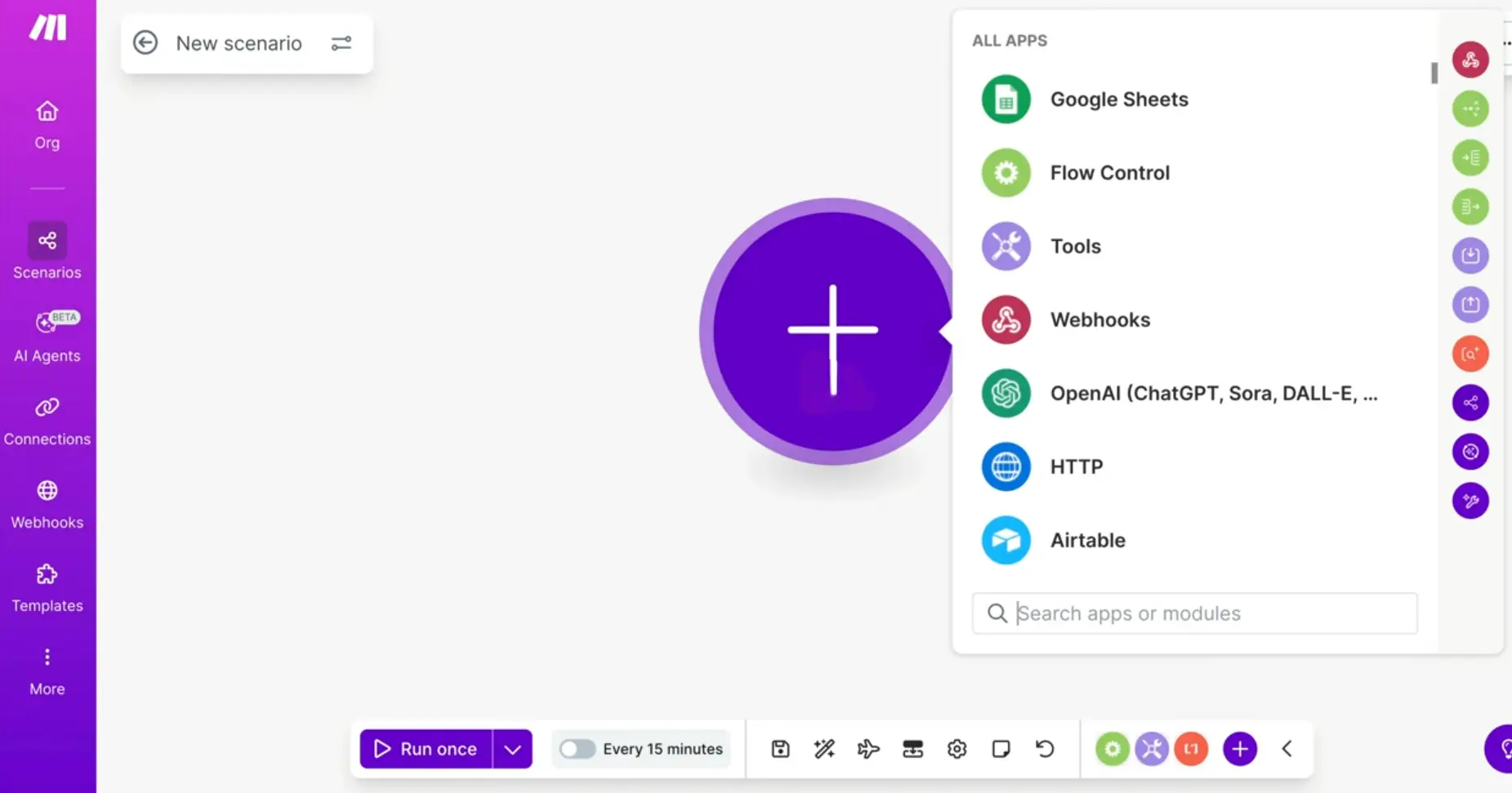
Scenario: The master automated visual workflow you create inside Make. It is the complete journey showing data traveling from its starting point to its final destination.
Module: The circular visual bubbles on the Make canvas representing specific apps, such as a Shopify module or a Slack module.
Router: A visual digital fork in the road that inspects incoming data and directs it down different paths based on specific rules you define.
Operation: Every individual action a module performs inside Make, such as reading an email, creating an invoice, or sending a message. Make calculates its plans based on operations.
01. Identity & Origin: The Prague Engineering Breakthrough
Make.com began its journey in Prague, Czech Republic, in 2012 under its original name, Integromat. It was founded by a dedicated team of systems architects: Ondrej Gazda, Patrik Simek, and Roman Brslica. At the time, early automation tools existed on the market, but they were severely limited. They operated like linear conveyor belts: when step one happens, do step two. If your business had complex logic, such as: If the customer spent over one hundred dollars, send them a VIP gift, but if they spent less, send a standard receipt, early tools completely broke down.
The Integromat engineers refused to build a simple linear conveyor belt. They built a multi-dimensional visual canvas. They introduced visual branching, dynamic data iterators, error handling fallbacks, and real-time execution tracking. In 2020, global enterprise execution management giant Celonis recognized the architectural superiority of the platform and acquired Integromat. In 2022, the platform was officially rebranded as Make.com, accompanied by an ultra-fast visual overhaul and an expanded library of over two thousand native application integrations.
Today, Make is utilized by over one million organizations across the globe, from small solopreneurs to multi-billion-dollar institutions like Spotify, Heineken, and Uber. It was engineered specifically for the Resourceful Systems Architect: the founder who refuses to waste human hours on repetitive busywork and demands the leverage of automated operations without paying enterprise custom software fees.
02. The Command Center Analysis: The Infinite Visual Canvas
To understand why Make represents such a massive leap forward in software usability, look at our lead researcher audit of their live visual scenario environment below.
03. The Mechanics: How Does Make Actually Work? (The Lego Analogy)
To demystify automation for everyday founders, imagine your business is a high-tech plumbing system. In traditional manual operations, every app in your business is a separate bucket of water. When water fills Bucket A (a new customer order), you have to physically pick up a cup, scoop out the water, walk across the room, and pour it into Bucket B (your shipping spreadsheet).
Make acts as the clear acrylic pipe system connecting every bucket together. It functions through four fundamental mechanical actions:
1. The Trigger (The Valve Opens): An event occurs in the real world. A customer submits a form, a payment clears in Stripe, or an invoice is marked paid. Make detects this immediately using an instant Webhook, like an automatic valve opening.
2. The Router (The Intelligent Railway Switch): The data travels down the pipeline and encounters a Router. The Router inspects the payload. If the order value is over five hundred dollars, the switch directs the data down Track A, sending an urgent alert to the store owner. If the order is standard, it directs the data down Track B for regular processing.
3. Data Mapping (The Translation Desk): Different software programs speak different languages. One tool calls a customer name Customer_First_Name, while another calls it Given_Name. In Make, you visually drag the name pill from App A and drop it into the name slot of App B. The system translates the data instantly without errors.
4. Error Handling (The Safety Net): What happens if an external app temporarily goes offline? In traditional code, your system crashes and the customer order is lost. In Make, you can attach an Error Handler module: a visual safety net that says: If this app fails to respond, wait ten minutes, try again, and save a backup copy to a private spreadsheet so nothing is ever dropped.
04. Real-World Business Automation: From Physical Trades to Digital Shops
A common misconception is that workflow automation only benefits software companies or digital agencies. That assumption is completely wrong. In reality, physical service businesses and local trade owners gain the greatest leverage from automation because their daily work requires their physical presence on a job site.
Consider how automation transforms everyday physical and service enterprises:
The Plumbing Contractor: When an emergency call comes in through a website form while the plumber is under a sink with a wrench, Make instantly captures the request. It sends an immediate text message to the customer confirming the booking, adds the location to the technician's calendar, and generates an emergency quote in their accounting software without the plumber touching their phone with dirty hands.
The Hair and Beauty Salon: When a client books an appointment, Make records the slot, sends an automated reminder message twenty-four hours before the appointment to eliminate costly no-shows, and automatically messages the client two hours after their haircut asking for a Google review, continuously building the salon's local reputation on autopilot.
The Construction and Trade Business: When a building subcontractor submits an invoice by email, Make reads the attached document, matches it against the active project spreadsheet in Google Drive, checks the line items, and alerts the business owner on their mobile messaging app for a single-tap payment approval.

To see how this works for growing makers, look at a custom hardwood furniture workshop scaling from local orders to national delivery. When a client commissioned a dining table, the administrative burden was exhausting. The shop owner spent twenty hours every week creating invoices in Xero, writing timber cutting lists in spreadsheets, and texting craftsmen schedules. Hiring a dedicated office assistant would have added thousands of dollars in monthly payroll. Instead, the owner connected their customer order form directly to Xero and Google Drive inside Make. The moment an order was submitted, the invoice was generated, cutting sheets were filed, and workers received their daily tasks automatically. The business owner bought back twenty hours of craftsmanship every week for less than ten dollars a month.
05. The Financial Audit: Make.com 2026 Tiers and Operational Leverage
As Lead Researchers, we must evaluate software strictly by return on investment. Make operates on an Operations-Based Pricing Model. An operation is counted every time a module executes a task. Here is the realistic financial landscape for merchants in 2026.
The 2026 Make.com Operational Price Stack
- Free Plan ($0 per month forever): Delivers 1,000 operations per month, access to over two thousand apps, and unlimited active scenarios. Unbeatable for solo founders testing their first automated workflows with zero financial commitment.
- Core Plan (Roughly $9 per month billed annually, or $10.59 monthly): Unlocks 10,000 operations per month, unlimited visual scenarios, and minute-by-minute execution intervals. The definitive sweet spot for active e-commerce merchants and growing digital services.
- Pro Plan (Roughly $16 per month billed annually, or $18.82 monthly): Delivers priority scenario execution, custom variable storage, full-text execution search, and advanced multi-step error handling for businesses where downtime equals lost revenue.
- Teams Plan (Roughly $29 per month billed annually, or $34.12 monthly): Engineered for collaborative businesses. Adds multi-user roles, shared team workspaces, and high-volume operations scaling for scaling organizations.
Strategic Math: The Core Plan at $9 per month delivers 10,000 operations. If an automated scenario replaces just thirty minutes of manual data entry each day, you are buying back fifteen hours of human labor every month for less than sixty cents an hour.
06. Architectural Comparison: Make.com versus Zapier
At Business Lens Lab, our mission is to deliver objective clarity without commercial bias. When evaluating workflow automation, business owners constantly compare the two undisputed global leaders: Make.com and Zapier. Neither tool is universally superior. Each was engineered to solve a completely different operational need.
Where Zapier Excels: Zapier is the pioneer that built the modern automation industry. Its greatest competitive advantage is the sheer size of its integration ecosystem, connecting over seven thousand different web applications, which is more than three times the size of any competitor. If your business relies on niche software programs or specialized local apps, Zapier almost certainly supports them out of the box. Furthermore, Zapier has virtually zero learning curve. For straightforward, two-step linear automations, such as saving an email attachment directly into a Dropbox folder, Zapier can be configured in two minutes by anyone without technical guidance.
Where Make.com Excels: Make was built from the ground up as an interactive visual canvas. Its primary advantage is architectural depth and operational efficiency. While Zapier treats workflows like straight vertical lists, Make provides an infinite spatial canvas where you can build multi-branch routers, complex data iterators, and custom error handling nets. Most importantly, Make is engineered for high-volume operations. Because its pricing model delivers up to five times more task executions per dollar than Zapier, Make allows growing enterprises to run complex, multi-step workflows without experiencing sudden software subscription spikes.
The Objective Choice: Choose Zapier if you want instant setup for simple two-step workflows and rely on uncommon apps that demand its massive integration catalog. Choose Make.com if your business runs complex multi-branch processes, handles thousands of monthly transactions, and demands visual control over how data flows across your company.
Make.com is the ultimate force multiplier for the modern one-operator enterprise. It dismantles the friction between fragmented software tools, transforming chaotic manual data entry into an automated, error-free machine. For nine dollars a month, it eliminates the need for junior administrative staff and frees the founder to focus entirely on high-value strategic growth. It is a non-negotiable operational asset for any serious digital business.
Lab Rating: 9.9/10, The Undisputed Automation Standard
Primary Recommendation: Begin with the 1,000-operation Free plan to connect your first two business applications. Once your automated workflow saves you two hours of manual labor, transition to the Core plan at $9 per month to orchestrate your entire commercial ecosystem.